> ## Documentation Index
> Fetch the complete documentation index at: https://docs.sarasfinance.com/llms.txt
> Use this file to discover all available pages before exploring further.
# Business rules
**Overview**
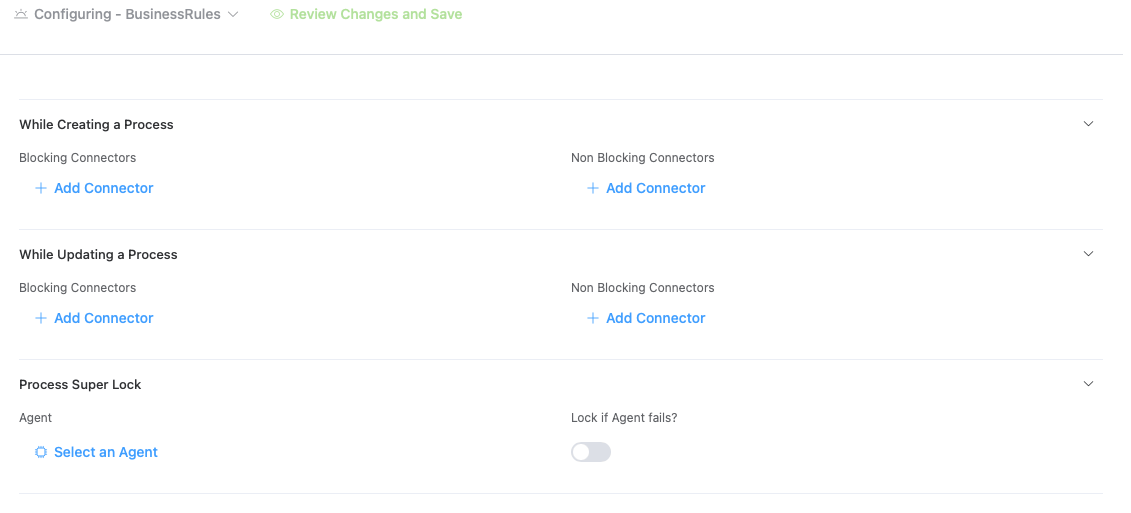
Business Rules are intelligent agent connectors that execute automated logic, validations, and transformations. They enforce business requirements, automate repetitive tasks, and ensure data consistency. They are executed when a process is created or updated for a sub project.
**Purpose**
* Automate business logic enforcement
* Execute intelligent decision-making
* Validate data against business requirements
* Transform and enrich data automatically
* Support complex conditional processing
**Business Rules Architecture**
Business Rules operate through **Agent Connectors**, which are groupings of multiple agents that work together to accomplish specific business objectives.
**Business Rule Execution Triggers**
| Trigger | Timing | Use Case |
| ------------- | ----------------------- | ------------------------------------------------------- |
| **On Create** | When new record created | Initialize defaults, validate inputs, trigger workflows |
| **On Update** | When record modified | Validate changes, cascade updates, trigger reactions |
**Super Lock**
An agent could be assigned to apply super lock to a resource for the process. A default behaviour could also be assigned when the agent fails.
 ## Process Context Passing & Consumption
When a business rule (blocking or non-blocking connector) executes, the platform packages the process context into the `slots` of the agent's payload. This allows the target agent to access and inspect process details.
### Context Structure
The payload sent to the agent is structured in the `slots` map as follows:
| Slot Key | Type | Description |
| :------------- | :------- | :----------------------------------------------------------------------------------- |
| `process` | `object` | The complete serialized process record (containing all fields, stage, status, etc.). |
| `fieldsConfig` | `object` | The configuration of fields for the sub-project. |
| `updates` | `object` | The payload of changes being made (available only during `update` triggers). |
| `metaDetails` | `object` | System metadata for the trigger/request. |
| `fields` | `object` | Initial field values (available only during `create` triggers). |
### Consuming Context in the Agent
Within the agent code (e.g., Python code executors), the slots can be accessed directly from `metaData`. For example:
```python theme={null}
# Accessing process context inside a user Python agent executor
process_data = metaData.get("slots", {}).get("process", {})
process_fields = process_data.get("fields", {})
# Inspecting modified fields during an update
updates = metaData.get("slots", {}).get("updates", {})
# Validate fields
if process_fields.get("amount") > 10000 and not updates.get("approvedBy"):
raise Exception("High-value transactions require compliance approval.")
```
### Returning Updates to the Process
To update the process fields from the agent:
1. Return a dictionary containing a `result` key (e.g. `{"result": {"status": "APPROVED", "remarks": "Auto-verified"}}`).
2. The platform automatically merges this `result` back into the process's dynamic `fields`.
3. If a blocking agent action fails or raises an error, the platform aborts the process creation/update transaction.
**Examples**
Validates data against rules, patterns, or business logic. Blocks action if validation fails.
Transforms and enriches data. Calculates computed fields and normalizes values.
Integrates with external APIs and services. Fetches data and triggers remote actions.
Makes intelligent decisions based on conditions and business logic. Routes workflows.
Sends notifications via email, Slack, webhooks, or other channels. Alerts users and teams.
Searches and retrieves data from existing records. Performs duplicate checking.
## Process Context Passing & Consumption
When a business rule (blocking or non-blocking connector) executes, the platform packages the process context into the `slots` of the agent's payload. This allows the target agent to access and inspect process details.
### Context Structure
The payload sent to the agent is structured in the `slots` map as follows:
| Slot Key | Type | Description |
| :------------- | :------- | :----------------------------------------------------------------------------------- |
| `process` | `object` | The complete serialized process record (containing all fields, stage, status, etc.). |
| `fieldsConfig` | `object` | The configuration of fields for the sub-project. |
| `updates` | `object` | The payload of changes being made (available only during `update` triggers). |
| `metaDetails` | `object` | System metadata for the trigger/request. |
| `fields` | `object` | Initial field values (available only during `create` triggers). |
### Consuming Context in the Agent
Within the agent code (e.g., Python code executors), the slots can be accessed directly from `metaData`. For example:
```python theme={null}
# Accessing process context inside a user Python agent executor
process_data = metaData.get("slots", {}).get("process", {})
process_fields = process_data.get("fields", {})
# Inspecting modified fields during an update
updates = metaData.get("slots", {}).get("updates", {})
# Validate fields
if process_fields.get("amount") > 10000 and not updates.get("approvedBy"):
raise Exception("High-value transactions require compliance approval.")
```
### Returning Updates to the Process
To update the process fields from the agent:
1. Return a dictionary containing a `result` key (e.g. `{"result": {"status": "APPROVED", "remarks": "Auto-verified"}}`).
2. The platform automatically merges this `result` back into the process's dynamic `fields`.
3. If a blocking agent action fails or raises an error, the platform aborts the process creation/update transaction.
**Examples**
Validates data against rules, patterns, or business logic. Blocks action if validation fails.
Transforms and enriches data. Calculates computed fields and normalizes values.
Integrates with external APIs and services. Fetches data and triggers remote actions.
Makes intelligent decisions based on conditions and business logic. Routes workflows.
Sends notifications via email, Slack, webhooks, or other channels. Alerts users and teams.
Searches and retrieves data from existing records. Performs duplicate checking.